Search
Close this search box.
Search
Close this search box.
Search
Close this search box.

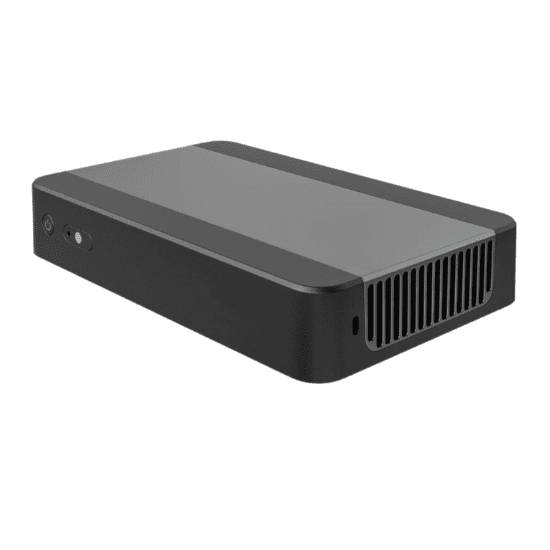
New BYOM Wireless Presentation Collaboration Box,Content share from laptops Tablets Video Conference

4K Video Collaboration BYOM Presentation System ClickShare Quickshare Content Control,RS232 Control,Third party control,Dual Screen BYOM Switcher.

Weight 500 g
Dimensions 22.5 × 14 × 4 cm
HDMI Version

4K60Hz

CPU

ARM Cortex-A55*4

Wireless Mirroring modes

Airplay/Miracast/Chromecast support DLNA/Miracast/Airplay/Chromecast/WiDi

Transmission Distance

50M in open space,no obstacle

Multiviewer

Support 16/9/6/4 screen, 4k pixel to pixel

Resolution

2G+8G/4G+32G(Pro)

Wifi

Dual Wifi 5.8G softAP +5.8G wifi

Markets

Video Conference room for Venues, Government, Retail, Hospitality, Residential, Corporate, Education

BYOM

Support all major conferencing services such as Teams,Zoom,and GoToMeeting.

Remote webpage casting

Support

Broadcasting and central management

Support

Detailes About New BYOM Wireless Presentation Collaboration Box,Content share from laptops Tablets Video Conference

New 4K Wireless AV Content Sharing & BYOM collaboration System (4-9 devices )

Transmitter (HDMI Dongle,Type C dongle,USB Dongle) and Receiver

Four,Nine,Sixteen devices share on One Screen

BYOM Wireless Collaboration Box
BYOM, Wireless Collaboration, Video Conferencing System enables seamless wireless conferencing by connecting the room display and devices like cameras, microphones, and speakers to laptops. It supports dual-screen collaboration and up to 9 split screens for casting.
new byom wireless presentation collaboration box,content share from laptops tablets video conference
Introduction

wireless conferencing solution is designed to connect the room display to be shared with remote meeting participants to provide a better collaboration experience between in-room and remote participants, it enables people to wirelessly connect the room camera, microphone, speaker and display to their own laptop and reverse transmission and audio back to the laptop when wireless conferencing, it supports dual screen collaboration for both local and remote meeting. It supports up to 9 split screens for screen casting.

byom wireless presentation system content share from laptops tablets video conference

Main features:

Single screen: 4k, point to point
Support for 3840 * 2160 resolution, compared to the traditional 1080p, the picture quality is enhanced, more rich details, to give you a visual experience like a cinema.
USB Ring Out
The USB port of the box is connected to the external device, and the data of the device can be communicated with other USB ports, and the computer can access the device USB port can directly call the data of external devices.
Dual-Screen Collaboration
With only one computer, can dual-screen different displays, one screen display the content of the main screen, and the other screen display extended screen.
Webpage Settings
Screen settings and system settings can be performed on the box through the background of the webpage.
Nine picture segmentation
It can support the terminal 9 screen projection and four screen display.
USB touch back, focus on speech
Touch back, so that the large screen better use, support touch conference tablet, projector, splicing screen, etc.
Miracast&Airplay hybrid projection
Don’t download an APP for Android or iPhone,Use the phone’s built-in wireless and screen mirror to cast.
BYOM
With TYPE-C/USB two-in-one transmitter,The screen projection also support USB Camera and micro-phone to send back to the computer,Compatable with mainstream video conferencing software:Tencent,Ding Talk,ZOOMS,TEAMS,etc.

Technical specifications

Category Specification
Hardware Specifications
CPU ARM Cortex A55 x 4
Storage Configuration 4G DDR + 32G FLASH
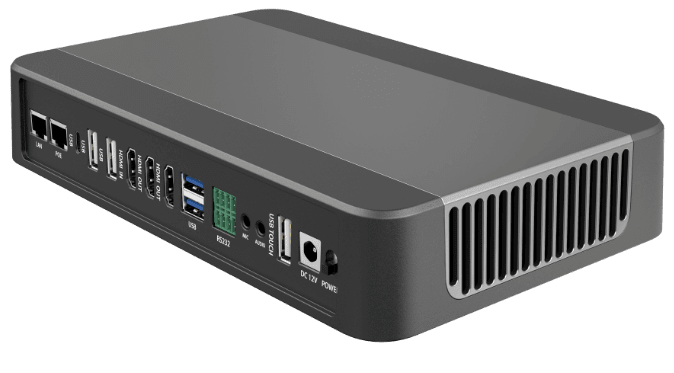
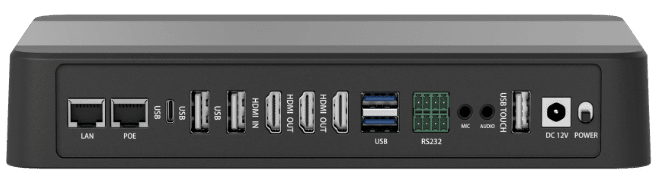
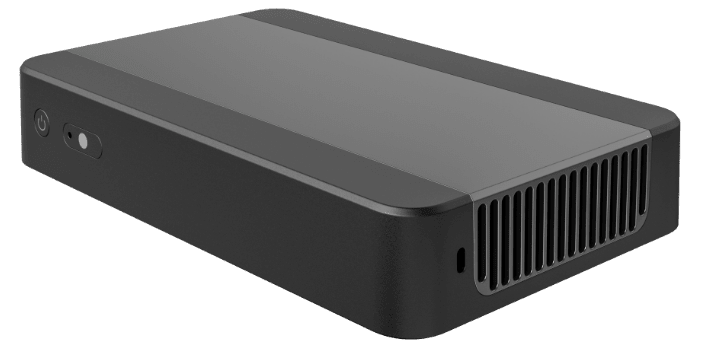
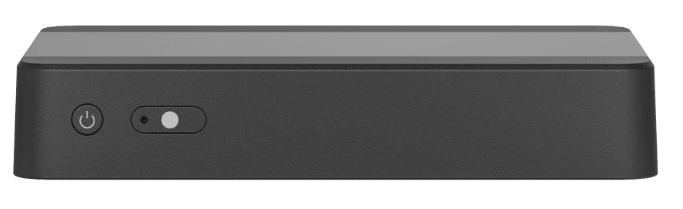
Hardware Ports 2x HDMI Output (1x 4K 60Hz, 1x 1080P 60Hz); 1x HDMI Input; 3.5mm Audio Output; 3.5mm Mic Output; 2x RS232; 2x USB 3.0 Host Type-A; 2x USB 2.0 Host Type-A; 1x USB Touch; 1x Type-C Port; 1x 12V/3A DC Power Jack; 1x RJ45 LAN Port; 1x POE Port; 1x Power Button; 1x Standby Button
Power Consumption Input: DC 12V; Max Consumption: 36W
Size 180 * 110 * 35mm (L * W * H)
Environment 0°C ~ 40°C (Working Temperature); 10% ~ 90% (Working Humidity)
Wireless Transmission Parameter
Protocol DLNA, Miracast, Airplay, Chromecast
Dual Wi-Fi 5.8G SoftAP + 5.8G WiFi
Number of Connections 128
Transmit Distance No Obstacle: 50m
BYOM Support for all major conferencing services such as Teams, Zoom, and GoToMeeting
Mirror Back Support
Touch Control System Mouthpiece: USB HID; Support Mouse Mode, IR Touch Control, Capacitive Touch Panel
Video/Audio Video Decoding: Support H.264, H.265, VP8, RV, WMV, AVS, H.263, MPEG4; Decoding Solution: 4K
Bridging Support both wireless and wired bridging
Wireless Mirroring Modes
AirPlay/Miracast/Chromecast Support DLNA, Miracast, Airplay, Chromecast, WiDi
Wireless USB Dongle Support Windows/Mac/Linux
Mirroring via Software Support Windows/Android/iOS/Mac
Resolution All three screen transmission methods support 4K; Delay Time: 60~180ms; All support Computer Expansion Screen, TouchBackControl, and Mixed Cast Screen
Device Management
Centre Management RS232; API for third-party integrations
WebGUI Settings Built-in Web Back-End
Host Mode Mouse Controller
Other Functions
Rotation Mode Support 90°, 180°, 270° Photo Rotating
Dynamic Password Support APP Mirroring, AirPlay, Windows Software Mirroring
Audio Output Output from HDMI or USB can be set in the settings
Restart Timely Support regular restart function to ensure the healthy operation of the device
Other Apps Welcome Speech, with Classification Function File Browser, Screensaver
Authority Management When the device is displayed on the screen, it is allowed to display on the screen; Support 5.8G & 5.8G AP at the same time for mirroring (optional)
Router Mode Virtual cameras and microphones can be used on the computer through the BYOM-enabled screen transfer, a camera and a microphone device that wirelessly calls a USB interface connected to a receiving end
USB Wired Screen Projection Support Android/iOS USB Wired Projection
Broadcast Control Remote control of audio and video playback
Centralized Control Management Equipments in batch
Screen Projection Management When the device casts the screen on the screen, there is a permission before casting to the screen
Webpage Projection The computer interface can be shared through the webpage, and the box interface can be sent to the computer through the web page
Hybrid Projection Support Miracast and Airplay Hybrid Projection
ChromeCast Chrome Web Screen Projection
HDMI IN Touch The computer is connected to the box through HDMI and USB ports at the same time, which can support touch
USB Ring Out The USB port of the box is connected to the external device, and the data of the device can be communicated with other USB ports, and the computer can access the device USB port can directly call the data of external devices
Dual HDMI Output The two HDMIs can output the same or different pictures, and perform different display of multi-channel projection pictures
Dual-Screen Collaboration With only one computer, can dual-screen different displays; one screen displays the content of the main screen, and the other screen displays extended screen
Webpage Settings Screen settings and system settings can be performed on the box through the background of the webpage
Fittings
Power Adapter 1
Remote Control Included
Screen Transmitter Mating Type-C Screen Transmitter (Optional); HDMI Screen Transmitter (Optional); USB Screen Transfer Device (Optional)

BYOM:Wireless Shared Camera&Microphone

With TYPE-C/USB two-in-one transmitter, The screen projection also support USB Camera and micro-phone to send back to the computer, Compatible with mainstream video conferencing software: Tencent, Ding Talk, ZOOMS, TEAMS, etc
new byom wireless presentation collaboration box,content share from laptops tablets video conference
4K Pixel to Pixel Vivid Presentation

3840X2160P Resolution Support TYPE-C/Miracast/Airplay 4K screen projection

new byom wireless presentation collaboration box,content share from laptops tablets video conference
USB ring out between local room PC and wireless laptop
With a single USB-A port connecting the room PC to the base unit, the laptop can directly access the room PC’s data.
new byom wireless presentation collaboration box,content share from laptops tablets video conference
Web Page Casting
A sharing tool for screen casting in different places and visitors Chrome browser for Windows and Mac computers, Firefox browser projection, no need install the clients APP
new byom wireless presentation collaboration box,content share from laptops tablets video conference
Live-broadcast on the vertical screen and watch movies on the horizontal screen
Default vertical screen mode, switch horizontal screen mode to meet a variety of use scenarios
new byom wireless presentation collaboration box,content share from laptops tablets video conference
HDMl IN support display of set-top box, computer and Laptop, etc
new byom wireless presentation collaboration box,content share from laptops tablets video conference
Four Screens1080P Pixel to Pixel Display
Support terminal 4-16 screens projection Realize the integration of wired display and wireless screen projection
new byom wireless presentation collaboration box,content share from laptops tablets video conference
Accurate Writing and Annotation
The pen follows the heart, the size and color of the stroke can be changed as willing, and the writing is smoothly, convenient and fast

byom wireless presentation system content share from laptops tablets video conference

Remote Broadcast Centralized Management
Networked devices can be central managed remotely and push audio and video remotely. It ‘s convenient to view equipment usage, fault alarm, etc Facilitate centralized management of batch equipment and improve maintenance efficiency
new byom wireless presentation collaboration box,content share from laptops tablets video conference
APP free: Miracast& AirPlay Mixed Projection
Support full platforms: regardless of Windows/Mac, Or i0S/Android and other mobiles, Both support dynamic password protection
new byom wireless presentation collaboration box,content share from laptops tablets video conference
RS232* 2 for easily Access to central control
RS232 interface is provided to facilitate the central control system to control the projection. Other third-party devices can also be controlled through RS232

new byom wireless presentation collaboration box,content share from laptops tablets video conference

Compatible with 3-in-1 transmitter More usage
Provide USB, HDMl, Type-C transmitter, Meet your conference equipment with different interfaces

new byom wireless presentation collaboration box,content share from laptops tablets video conference

No driver, Plug and play

new byom wireless presentation collaboration box,content share from laptops tablets video conference

Drive-free installation Plug and play 4K Transmission

new byom wireless presentation collaboration box,content share from laptops tablets video conference

Popular Interface, Power supply and Integrated transmission Convenient plug and play

Product interface and size

new byom wireless presentation collaboration box,content share from laptops tablets video conference new byom wireless presentation collaboration box,content share from laptops tablets video conference

4K Type C USB dongle introduction

new byom wireless presentation collaboration box,content share from laptops tablets video conference

Application Example

Four or Nine devices in One Screen share, Multiviewer, Seamless switch, Multi person Presentation

Get Free Quote

Share New BYOM Wireless Presentation Collaboration Box,Content share from laptops Tablets Video Conference With Your Clients

Get Free Sample

Privacy Policy: Security and Privacy Guaranteed 100%!

Let's Have a Chat

Learn How We Help 100 Top Brands Gain Success.