
100Meter USB 3.2 Extender with USB-B USB-C Input,POC, HDBT

USB C 3.2 Extender,POC,Plug&Play,Easy operation
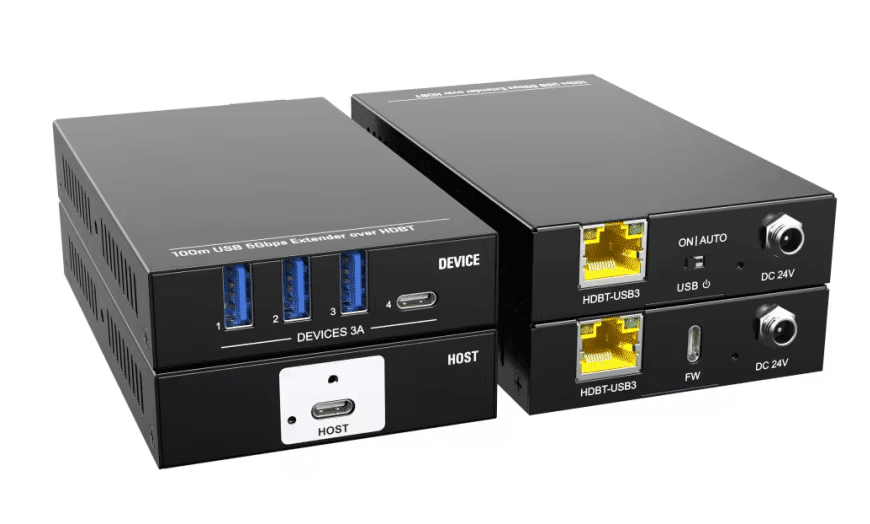
This product is a long-distance USB extender integrating HDBase Ttechnology. It includes a transmitter and receiver, allowing USB signal transmission over 100 meters. The transmitter features a Type-C port for connection to a PC or laptop. The receiver, equipped with USB power management, includes four USB ports. This extender also supports bi-directional 24V PoC (Power over Cable).
Features
Supports high-bandwidth USB 5Gbps
Transmission range of up to 100 meters
Four USB device ports, providing up to 3A of shared power
USB power support
Bi-directional PoC power, requiring power input from only one end
DC 24V 1.5A power supply with threaded lock feature
Specification:
Transmitter
Transmitter connector (1) Type-C USB
USB version:USB 3.2 Gen1
FW port:(1) Type-C USB
Product weight: 275g
Receiver
Receiver connector: (3) Type-A USB (1) Type-C USB
Power supply: The receiver shares a 3A current limit.
USB version:USB 3.2 Gen1
Product weight:275g
Control
Port:(1) 2-pin DIP switch
General
Transmission distance:Up to 100m by using CAT6a cable
Bandwidth:5Gbps
PoC standard:Bi-directional PoC 24V
Operating temperature: -10℃~+55℃
Storage temperature:-25℃~+75℃
Humidity:10%~90%
External power supply :Input 100VAC~240VAC,50/60Hz; Output24VDC1.25A
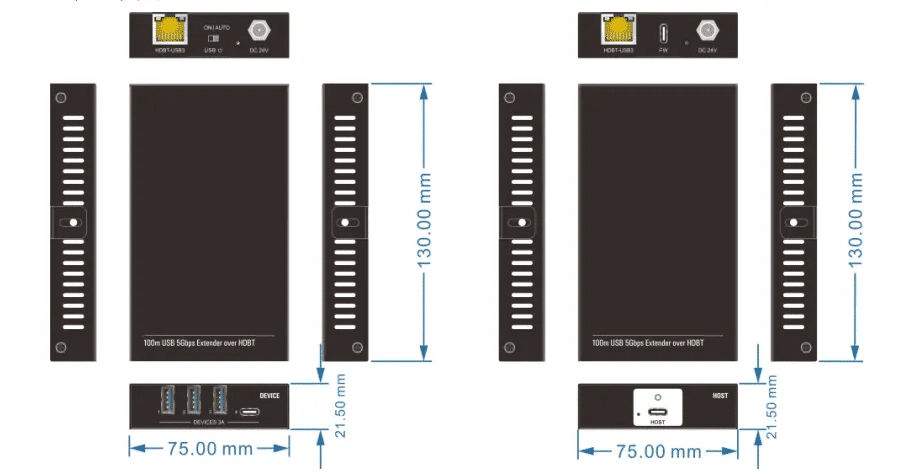
Chassic size(W*H*D):130.0mmx21.5mmx75.0mm
Transmitter interface

| Number | Name | Description |
| 1 | HOST Indicator Light: | The LED lights up blue when the host is connected. |
| 2 | HOST Type-C | USB 3.2 Gen 1, connects to PC/laptop. |
| 3 | HDBT-USB3 | * RJ45 port is used to connect to the extender unit and supports bidirectional 24V PoC (Power over Cable) supply. The yellow LED light indicates the HDBT connection status, and the green LED light indicates data activity. * Yellow light off: No CAT cable/active connection. * Yellow light blinking: Connection between host and device is in progress or unstable. * Yellow light on: Stable CAT cable connection between host and device. * Green light off: No USB data signal transmission. * Green light blinking regularly (every 500ms): USB 2.0 data is being transmitted. * Green light blinking irregularly (unspecified interval): USB data transmission failure. * Green light on: USB 3.0 data transmission. |
| 4 | FW | Firmware upgrade. |
| 5 | Power Indicator Light | The LED lights up green when the device power is on. |
| 6 | DC 24V Connection | Connect to 24V, 1.25A power adapter. |
Receiver interface

| Number | Name | Description |
| 1 | USB Interface | * Three Type-A USB 3.2 Gen 1 and one Type-C USB 3.2 Gen 1 ports for connecting KVM devices, cameras, or other USB devices. * The device shares a 3A current limit. |
| 2 | HDBT-USB3 | * RJ45 port used to connect to the extender unit, supporting bidirectional 24V PoC power supply. The yellow LED indicates the HDBT connection status, and the green LED indicates data activity. * Yellow light off: No CAT cable/active connection. * Yellow light flashing: Connection between host and device is in progress or unstable. * Yellow light on: Stable CAT cable connection between host and device. * Green light off: No USB data signal transmission. * Green light blinking regularly (every 500ms): USB 2.0 data is being transmitted. * Green light blinking irregularly (unspecified interval): USB data transmission failure. * Green light on: USB 3.0 data transmission. |
| 3 | USB DIP Switch | * One DIP switch for setting the power supply of USB device ports: * AUTO (default): Follows the host; USB device ports only output power when the host is in active connection. * ON: USB device ports always output power. |
| 4 | Power Indicator Light | When the device is powered on, the LED lights up green. If the current is too high, the yellow and green lights will flash alternately (when the total current limit for USB devices is exceeded). |
| 5 | DC 24V Connection | Connect to 24V, 1.25A power adapter. |
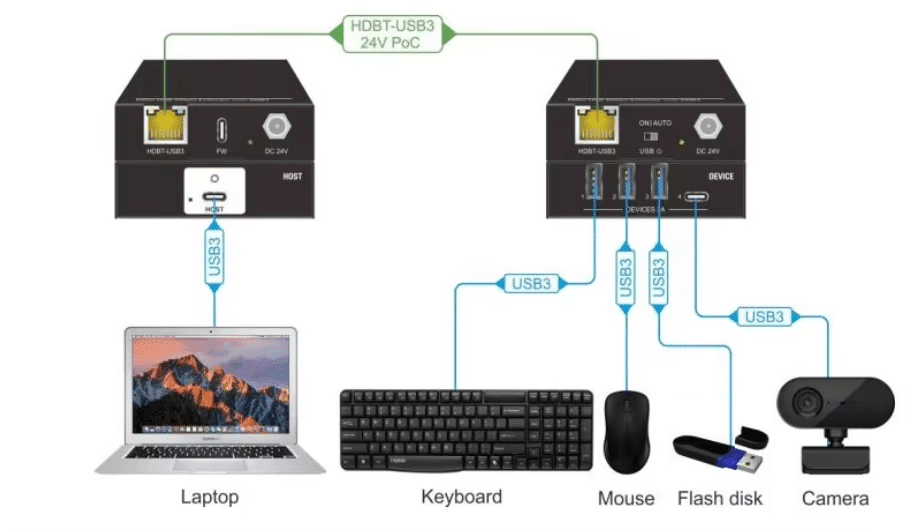
Connection diagram

Applications
Conference rooms
Classroom projector systems
Collaborative PC systems
Digital signage
Educational institutions
Boardroom systems


