



Seamless UHD Video &USB 3.0 KVM Switcher with Multiviewer Control
Overview
This 4K60 4×1 Seamless UHD Video & USB 3.0 KVM Switcher was designed for the purpose of supporting higher output resolution (4K@60) for multiple sources on a single screen. It can combine up to four video signals onto a single UHD or HD displayer. The user can manage each input, and create combinations of the four inputs on a single display, as well as adjust the position of any input.
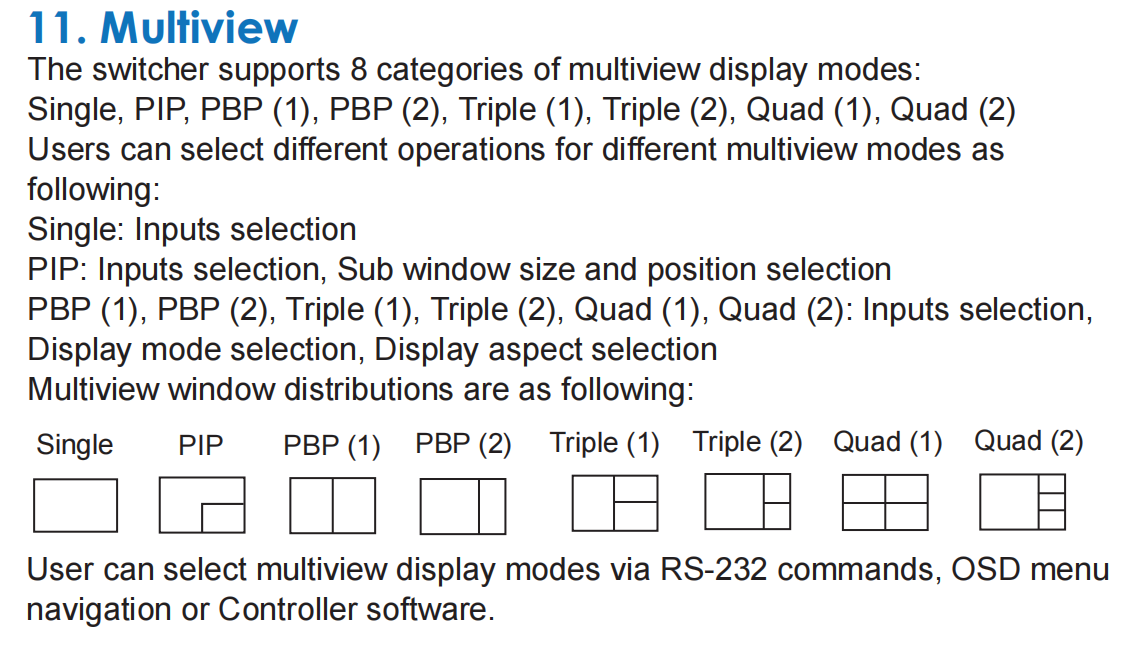
This product supports 8 display modes, within the mode range, users can freely switch 4-channel HD input signals. It can realize single screen display and multiview display on a single screen.
This device supports full range of input video resolutions up to 4K@60 (RB) and audio RCA /Optical de-embedding supported for external audio distribution systems.
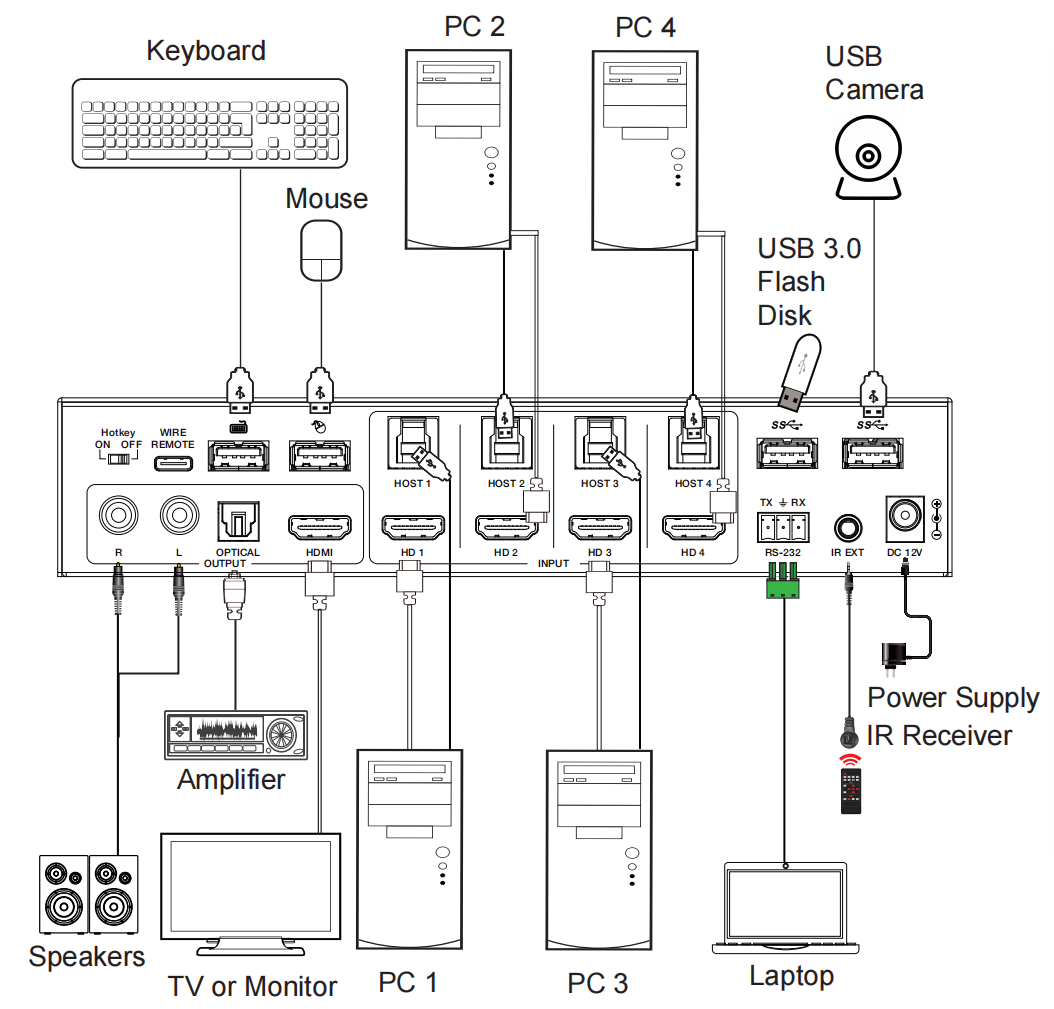
Besides, the switcher can transmit USB 3.0 signal up to 5Gbps for KVM function. It also supports direct switching through buttons on the front panel,
IR remote, and hotkey through keyboard/mouse connected to the special USB port. It provides a wide compatibility choice for different operating systems, such as Windows, Mac OS and Linux, no driver required and simple plug and play.
This device can be controlled via front panel buttons, IR remote, keyboard/ mouse hotkeys, OSD menu navigation, Controller software, RS-232 commands.
Features:
☆ HDCP 2.2 and HDCP 1.x compliant
☆ Support 18Gbps uncompressed video bandwidth
☆ Input and output resolutions support up to 4K2K@60Hz 4:4:4, as specified in HDMI 2.0b
☆ Support LPCM, DD+, DTS audio pass-through, up to 7.1 audio channel
☆ Seamless switching between input channels and combined multiple images on single UHD monitor
☆ Up to 8 display modes: Single, PIP, PBP (1), PBP (2), Triple (1), Triple (2), Quad (1), Quad (2)
☆ Seamless switching in single screen display mode
☆ Fast switching in multiview display mode
☆ Using only 1 set of keyboard, mouse and monitor to control 4 computers
☆ Built-in 3-port USB 3.1 Gen 1 hub with SuperSpeed 5Gbps data transfer rates, allowing you to share USB peripherals like printer, scanner, webcam and hard disk between computers
☆ Support multimedia, wireless keyboards and mouse
☆ Audio de-embedding via analog and optical fiber audio ports
☆ Support volume control and independent audio selection
☆ Support OSD navigation for advanced setting
☆ EDID management
☆ Control via front panel buttons, IR remote, keyboard/mouse hotkeys,
OSD menu navigation, Controller software, RS-232 commands
☆ Compact design for easy and flexible installation
Packing list
① 1 x 4K60 4×1 Seamless UHD Video & USB 3.0 KVM Switcher
② 1 x IR Remote
③ 1 x 3pin-3.81mm Phoenix Connector (male)
④ 1 x Fixed Frequency 38KHz IR Receiver Cable (1.5 meters)
⑤ 2 x Mounting Ear
⑥ 4 x Machine Screw (KM3*4)
⑦ 4 x USB Cable (USB 3.0 AM to BM, 1.8 meters)
⑧ 1 x 12V/2.5A Locking Power Supply
⑨ 1 x User Manual
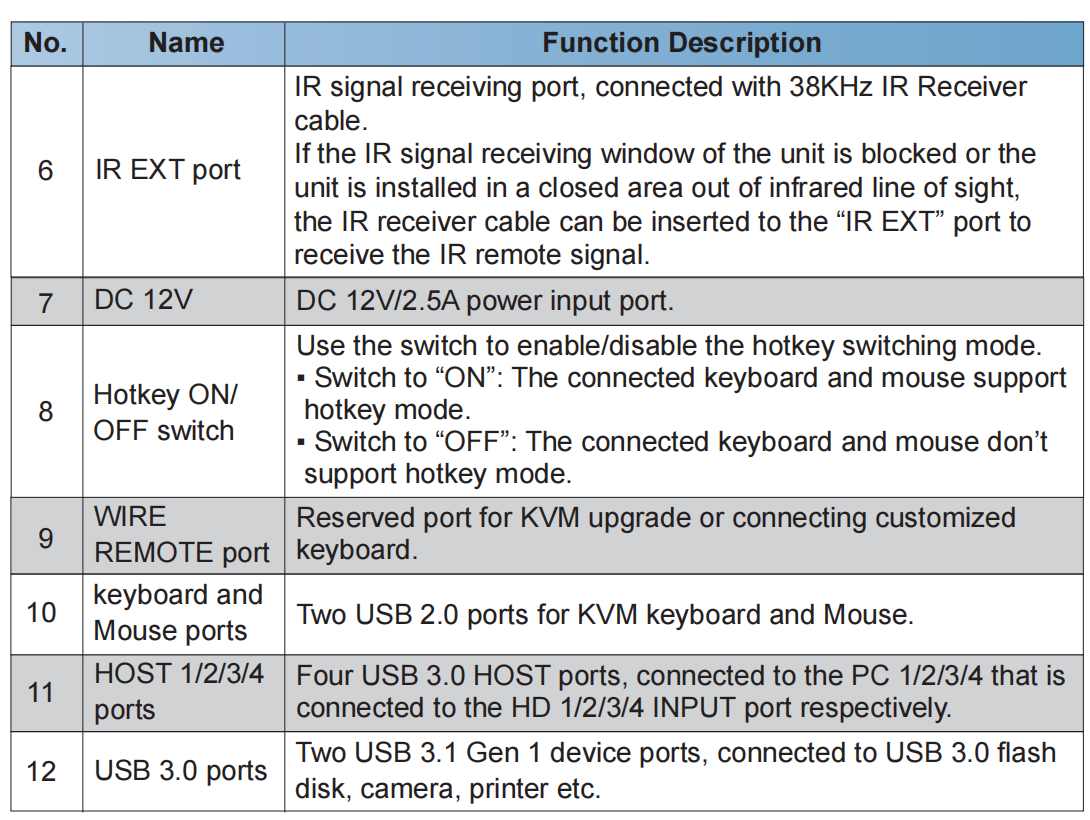
Rear Panel

Multiviewer control:PIP,PBP,Triple,Quad,
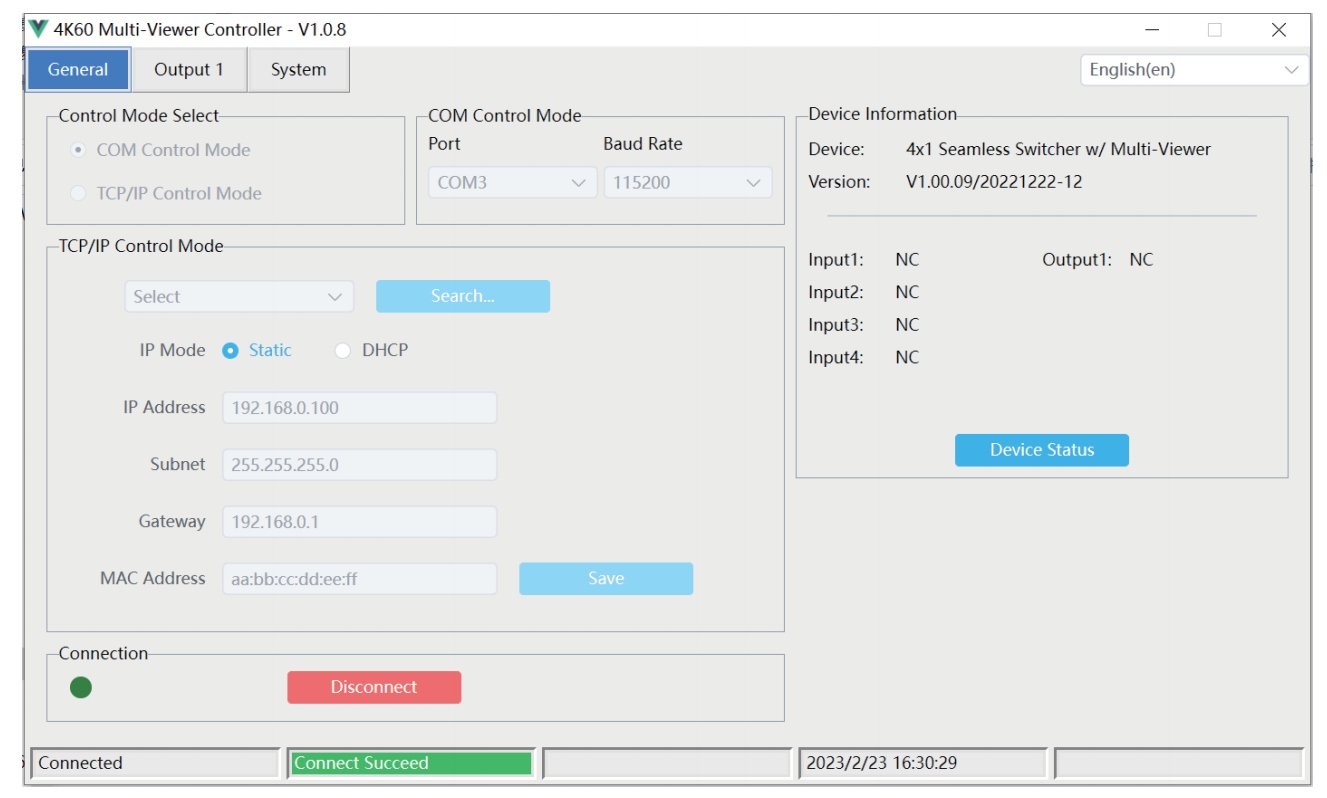
General Page Setting
Output Page setting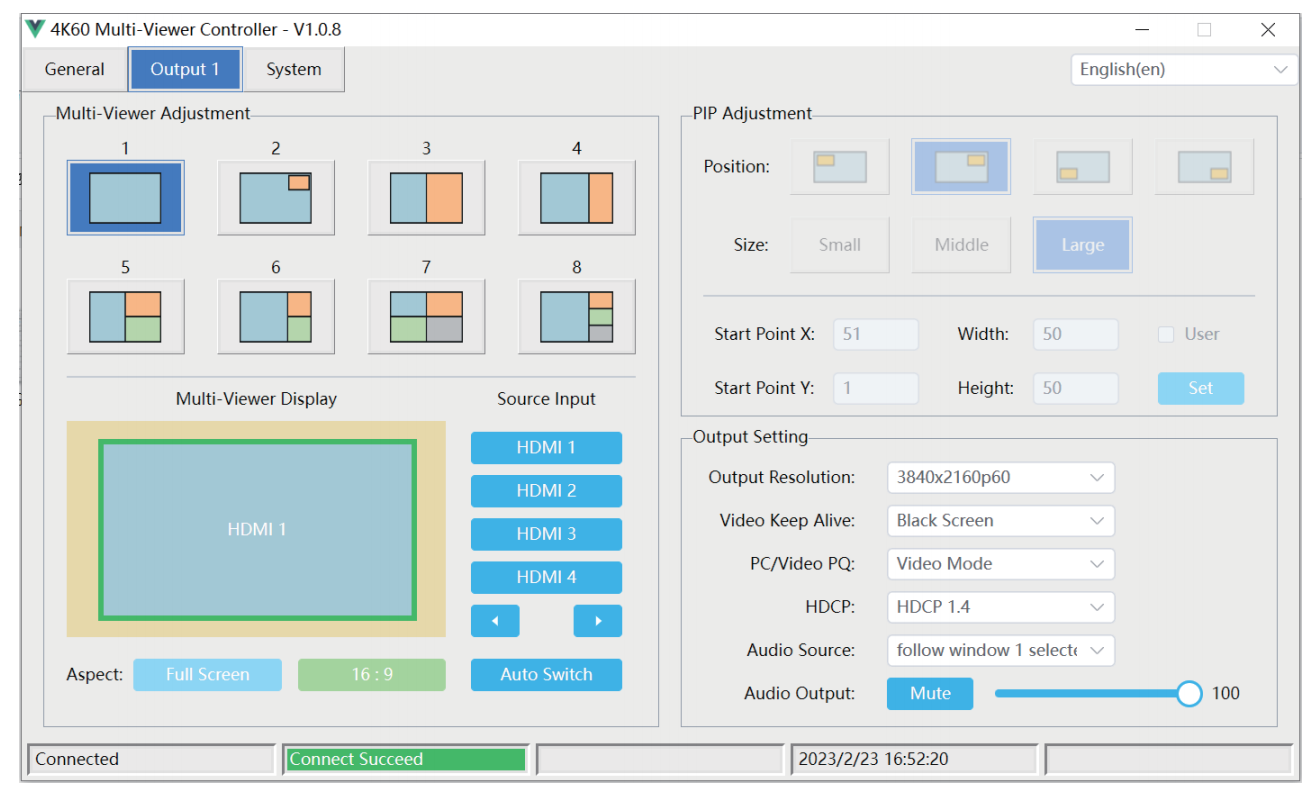
System page setting IR Remote

Hotkey Switch function
The Hotkey switch on the front panel allows you to enable/disable the hotkey switch function.
(1) When Hotkey switch to OFF mode, the hotkey switch function is disabled.
(2) When Hotkey switch to ON mode, the hotkey switch function is enabled.
Keyboard & Mouse Hotkey Function
When the hotkey mode is enabled, you can use keyboard and mouse hot keys to operate and control the product.
(1) Keyboard hotkeys are as following:

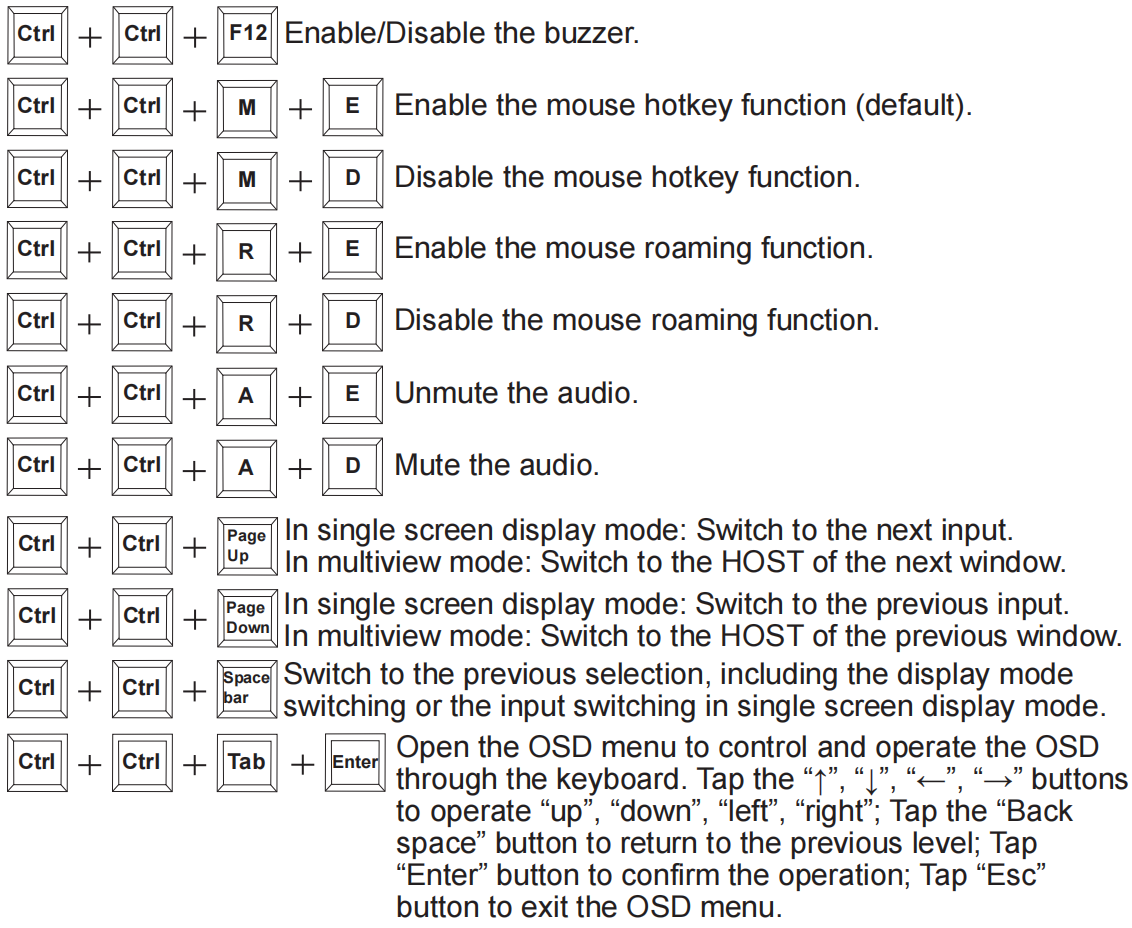
(2) Mouse hotkeys are as following:
Double-Click Middle-Right (Double-click the mouse scroll wheel, and then click the right button):
In single screen display mode: Switch to the next input.
In multiview mode: Switch to the HOST of the next window.
Double-Click Middle-Left (Double-click the mouse scroll wheel, and then click the left button):
In single screen display mode: Switch to the previous input.
In multiview mode: Switch to the HOST of the previous window.
Triple-Click Middle (Triple-click the mouse scroll wheel):
Switch to the previous selection, including the display mode switching or the input switching in single screen display mode.


