

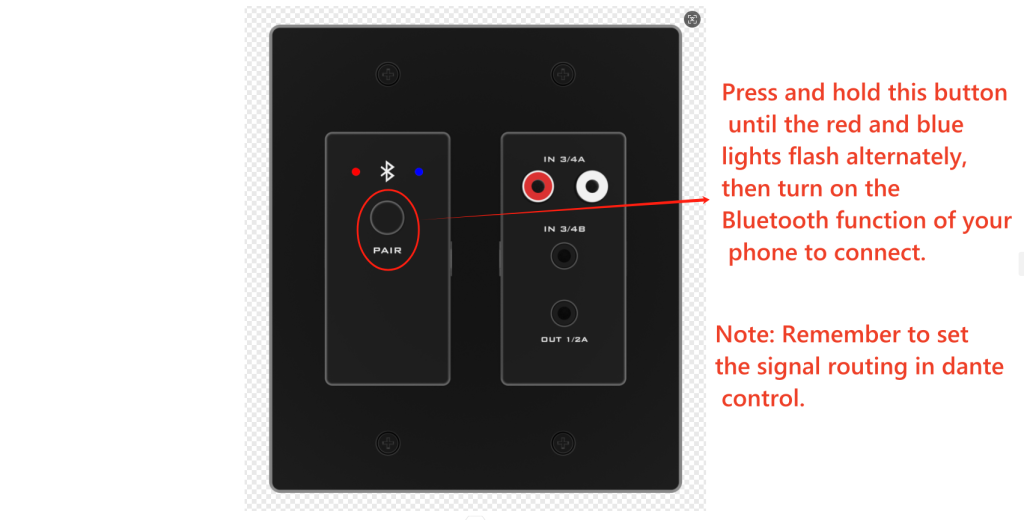
For the Bluetooth Dante panel, it supports connecting with bluetooth devices. How to pairing ? below is the operation
When pairing, the user only needs to press and hold the PAIR button on the panel for about 3S. ( Long press until the red and blue lights flash, not three seconds. Sometimes it takes more than three seconds.)
The LED red and blue indicators on the panel will start to flash alternately, indicating that the Bluetooth Dante is now visible to other Bluetooth devices and accepts pairing. Then you can turn on other Bluetooth devices to search for devices and pair them. When only the blue LED indicator flashes on the panel, it means that the paired connection is successful.
(Notes:When the Bluetooth dante maintains the last 10 paired devices, any previously paired devices on this list will be allowed to reconnect within the device range without re-requesting pairing. The user only needs to select the corresponding Bluetooth name on the smart device)
Dante Processor set volume on the Box

When phantom power is turned on at the input end, mobile phones or tablets that do not support phantom power cannot be connected.
If phantom power is not turned on at the input, mobile phones or tablets that do not support phantom power can be connected.
For more Dante Audio processor setting problems, please contact us 1@sz-sinowell.com, whatsapp +86 13728685427, we will assist you with our professional engineers to solve your problems ASAP.
